Just as I did last year, I’ve aggregated Black Friday and Cyber Monday deals for 2017 on audio and video gear you can use to create online content for your business.
Check out the list below, and if you find any great deals I haven’t listed, leave a link in the comments below or send me a tweet to @billwinterberg.
NOTE: Links to Amazon where applicable are my affiliate links, so I earn a small commission if you use the links to purchase (and THANK YOU, because that helps support the free content here at FPPad!). Also, links to online sites may not reflect Black Friday pricing until Thursday or Friday, so check back often if the prices don’t yet match the prices I cite in this post.
Last updated November 27, 2017 at 11:38 AM ET
Jump to: Cameras — Lights — Video Accessories — Computers and Storage
Cameras
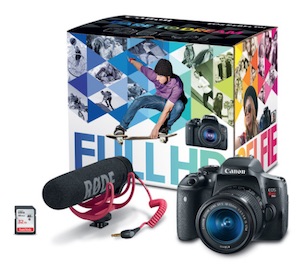 First up is a video creators kit featuring the Canon EOS Rebel T6i DSLR Camera at $649 from Amazon. B&H Photo also has the same kit for $649. I’ve seen several sales on the same camera and lens combo over at Target and Best Buy for $599, but for just $50 more for this package, you pick up the RODE VideoMic GO and a 32GB SD memory card that would cost about $120 when purchased separately, so you’re saving about $70 on these two accessories.
The T6i is a great DSLR to get started with video, as you can keep your equipment investment well below $1,000. Note, this camera has a “crop sensor” and not a full sensor like the more expensive Canon 5D line (starting around $2,000 just for the camera body!), but for production for a website and YouTube channel, many creators really won’t notice any drawbacks in using a crop sensor camera. But if your full-time business is landscape, architecture, or modeling photography, well, a full frame sensor is almost commonplace.
Also, why not buy the less expensive T6 or T5 cameras? Those cameras don’t have a touchscreen LCD display that swings out a full 180º to the side, which is super important when you’re filming yourself “selfie” style. You need to be able to see what the camera sees when filming yourself so you can set the focus, ISO, and lens aperture accordingly for a high quality image. You just can’t to that on the fly with the Canon Rebel cameras with no “i” after their model number!
Canon 80D
Now if you want pixel resolution similar to a full frame camera without the full frame price, Amazon also has a deal on the Canon EOS 80D DSLR camera with the video creator kit at $1,399. B&H Photo has the same kit as well. Note that the 80D has an APS-C sensor, not a legitimate full frame sensor, but the sensor resolution is actually higher than some older model full frame cameras. Here’s a helpful review if you want to read more about the APS-C sensor.
Vlog Camera
 I use the term “vlog camera” for cameras you can keep in your pocket while on a trip, attending an event, or otherwise out of the office, but want to quickly take out a camera and record a quick thought, capture some time lapse, or shoot some b-roll footage for your video. I generally recommend two cameras for this kind of activity: the Canon G7X Mk II and the Sony RX100 V.
First, Amazon has a gift card bundle on the Sony RX100V right now for $949 including a $50 gift card, so your “net” price is $899. This isn’t a huge savings over the camera’s regular price of $949, but $50 will cover an extra battery and maybe an SD flash card to get you up and running with your vlogging.
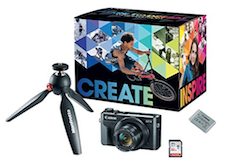
The vlog camera I use, the G7X, is bundled on Amazon for $699 ($50 savings) which includes a 32GB flash card, Manfrotto PIXI MINI Tripod, and an extra Canon NB-13L battery (key if you want to vlog for a full day).
Note that neither camera has a jack for an external microphone, so these are not ideal for filming video in a studio or office as your main camera unless you have an external audio recorder that you will use for an audio track. Instead, I use my vlogging camera to capture b-roll at events and use as a second camera angle while my primary camera is a DSLR with the RODE microphone (or wireless lavalier) plugged directly into the camera for high quality audio.
Mevo Plus
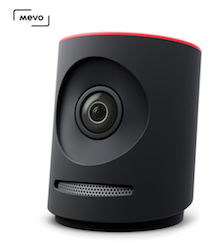
Here’s a camera for live streaming video. Check out the Mevo Plus at $399 for Black Friday ($100 off MSRP). If you want one camera that is super easy to set up and operate for a Facebook Live, YouTube, Periscope and more, the Mevo Plus can do it.
I highly recommend looking at ways to plug in an external microphone for your broadcasts unless you’re in a quiet office or studio, but that does add some cost an complexity to your setup. You can connect a microphone using a compatible mobile device connected to the Mevo Plus over WiFi, or you can add on the Mevo Boost accessory (another $250) that uses microphones connected via a USB interface (see how to connect microphones via USB in this article).
Drones!
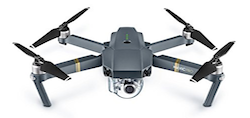 Ok, ok, you don’t *need* a drone to make videos, but man, are they fun to use and they do capture incredible aerial footage. So if you’re inclined to experiment with adding a drone to your production process, here are a few Black Friday deals.
First is the DJI Mavic Pro at $895 ($104 off). This is the drone I own and bring to conferences and events as well as my family trip to Yellowstone this past summer.
Keep in mind that you’ll not only need to learn how to legally operate the drone, you also need to learn how to operate a new camera with its own ISO, focus, and exposure settings. Be sure to allocate lots of time for practice before you fly for your finished videos.
A lower price point for a drone is the DJI Spark WITHOUT A CONTROLLER at $399 for Black Friday. The Spark is a bit more compact than the Mavic Pro, but its arms don’t collapse and fold like the Mavic Pro, so this is a toss-up on how easy it is to stuff into a backpack compared to the Mavic Pro.
Also, to save money, you can choose not to buy the controller and fly this exclusively with your mobile phone, but your controls will be more limited than if you had a full handheld joystick. If you want the power of a joystick, then upgrade to this DJI Spark Fly More Combo at $599 (regularly $699).
Lights
Fotodiox has several Black Friday specials on lighting packages.
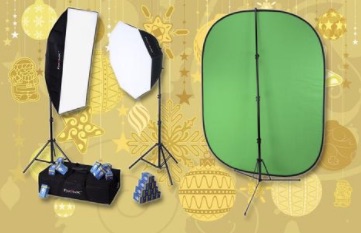 First is the Deluxe Video Studio Chromakey Starter Kit at $199 (regular price $344.95) which includes two of the 955 Compact Studio LED lights and a 5×7′ collapsible green screen background. These light boxes have 9 LED lights each(!), giving you TONS of dispersed light for your shoots, which is why this kit is approaching $200 (you can find cheaper kits, but you won’t find them with so many lights). One drawback is the size of the 5×7′ green screen, which might be a bit narrow and short if you hope to film your entire body in your shoot. But still, you can purchase other larger green screens to complement this set from Fotodiox.
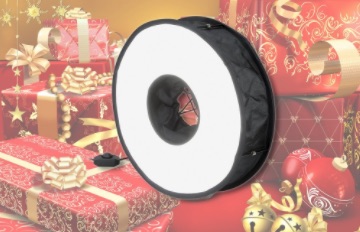 Also from Fotodiox is this clever collapsible LED ring light at $49.95 (regular price $129.95). Now before you buy this ring light, go watch my video with Bohuš Blahut of Fotodiox about the pros and cons of shooting with ring lights. Ok, so if you want an inexpensive way to get started with a simple ring light, this kit is a great way to get started. Just remember that shadow helps you when filming, so you’ll likely want to add a few other lights in your setup to help with modeling on your video subject (likely yourself!).
Video Accessories
 One critical component of good videos is having good music. I’ve been a subscriber of Soundstripe for a year now, a service that offers unlimited licensing of tracks in their music library for a fixed annual subscription.
Now through Cyber Monday, get your first year subscription for $87, 35% off the regular annual subscription of $135. After the first year, the subscription renews at the standard $135 per year.
When typical tracks from Premium Beat and Tune Fruit run $40 to $100 EACH, getting an annual subscription to an expanding library of high quality music for $87 is incredible! If you end up using just two songs from Soundstripe in a year, you’ve recouped your subscription.
Computers and Storage
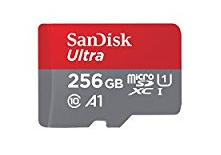 For Black Friday, Amazon is offering 30% to 70%(!) off SanDisk memory cards. Look for minimum speeds of Class 10, the same as UHS Speed 1, for filming 1080 HD video, and consider the faster UHS Speed 3 for filming in 4k. The 64GB micro SD card was as low as $13.99, but even at Friday’s price of $14.99 it’s a really good deal!
The more videos you make, the more memory cards you’re going to need (and remember, flash memory will get slower with age, so if you shoot videos each day, your memory card’s speed will get slower and slower over time. It takes about a year or two to slow down, but you’ll notice it for sure when it takes a long time to move footage to your computer!)
Hard Drives
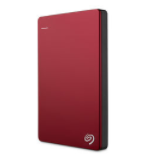 B&H Photo has $15-$20 off 2TB Seagate portable hard drives, which come in handy for offloading raw footage and editing project files from your laptop onto some kind of backup device.
I always bring two of these drives along with me to video shoots so I have a place I can offload extra footage, but I remember buying my 1TB drives at $59.99, which is now the price of a 2TB drive with this Cyber Monday special!
Desktops and Laptops
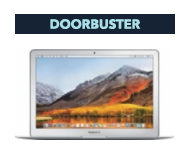 I admit, I have a preference for Apple computers, especially because I edit all my videos in Final Cut Pro. That said, know that you can find some great deals on PCs that run Windows elsewhere, but I’m just going to list the deals I find on Apple.
For Cyber Monday, B&H has a killer deal on a 15.4″ MacBook Pro with Touch Bar at $1,899, ($900 off MSRP, but about $425 off the lowest Amazon price). This is the laptop with the 2.7 GHz Intel Core i7 Quad-Core processor, 16GB of 2133 MHz RAM, and 512GB PCIe SSD. These are just about the specs that match the MacBook I use (see below), but a little warning, you might find the 15″ form factor to be a bit too bulky to travel with this laptop in most backpacks. It’s also heavier than the 13″ form factor, but I will admit that the extra screen real estate will go a long way when doing multi-cam editing when you’re away from your large screen in your home office!
Best Buy has a number of Apple laptops and desktops on sale for Black Friday, with savings ranging from $150 to $250. What do I use to edit on the road? A mid-2015 13″ MacBook Pro with the 3.1GHz Core i7 processor, 16GB RAM, and 512GB flash drive. It’s a workhorse that hasn’t failed me in two years and has been absolutely trouble free.

 In the race for robo adviser supremacy, neither Wealthfront nor Betterment wants to be runner-up.